Showing posts with label Software. Show all posts
Before you become an online earner, there are a few things worth knowing. The key is while some of these sites pay small amounts, add them all together and it can turn into an annual bonanza of £1,000s.

1.Watch videos, play games and earnSwagbucks


Swagbucks* is a fun survey site that pays you for completing short online tasks in virtual cash - you can then exchange this for real money, Paypal credits or gift cards to spend at Amazon, M&S and more. The site's huge in America, and here in the UK many MSE forumites are dedicated users.
Tasks include filling in polls, watching videos and searching using its page instead of Google. Advertisers pay Swagbucks to publicise their wares or do market research, and the site passes a cut to you. The more dedicated you are, the more you earn, though every task pays a different amount.
MSE Blagged - £15 Amazon/M&S gift card when you earn £5 in points
We've blagged a special deal for newbies and those who've previously registered for Swagbucks via MSE but haven't yet hit 849 points.

New users need to sign up for the site via this specialSwagbucks* link by Fri 27 Feb. Then if you earn £5 in bucks by Fri 27 Mar, Swagbucks will give you a £10 bonus, so you can get £15 of gift cards for Amazon, M&S, New Look, Starbucks, PizzaExpress and more.
The offer's also available to people who have previously registered with Swagbucks via MSE and haven't yet reached 849 points. Even if you're only a few points away from that mark, reach it before Fri 27 Mar and you'll get your £10 of bonus points.
How it works: Once you hit 849 Swagbucks, 1,698 bonus points will be added to the 'My gift cards' section of your account within 10 days. You'll then have enough to redeem a total of £15 in gift cards for Amazon, M&S and more - just go to the 'Rewards' section to cash your points in.
Gift cards arrive within 10 working days. Most can be redeemed in store or online within a year, though check as it varies by retailer. You can opt for PayPal credit instead, but you'll get less bang for your (Swag)buck - a tenner costs 1,999 points.

2.Online survey sitesEarn up to £800/year to give your opinion

Willing to give views on One Direction, washing-up liquid or whether we should quit the EU? If so, it's possible to earn £100s a year, without any special skill or talent.
It's all about stashing cash by filling in online surveys. All you have to do is sign up, wait for survey alerts to land in your inbox, then zip through the questions.
Polls are often fun. You get to vent about everything from video games to your sex life. For a full rundown of the top 20 free sites, plus tips to max your income, see the Online Survey Sites guide.
Committed survey-doers can get £200ish a year, but if you max it like MoneySaverfunnyguy:

3.Get paid to GoogleQmee

It's possible to get paid hard cash just for searching the web with Qmee*. It just involves downloading an add-on that sits on your internet browser. You then search online as you normally would on Google, Amazon, eBay, Yahoo!, Bing and now Tesco.
Qmee will show extra results or adverts alongside normal search results (see picture). Some firms pay Qmee to appear in these ads, and Qmee gives you a cut of the cash. If the Qmee result interests you, click it and you'll earn a few pence, usually 7-15p.

4.Earn hard cash for fun tasksGift Hunter Club

Online earning site Gift Hunter Club doles out points for watching videos, doing polls, entering competitions and completing other easy tasks.
You can convert these into cash through PayPal, Amazon vouchers and more. Just sign up and check the 'earn points' section. It shows the tasks available and what they pay.
MoneySavers reckon the site's fun, payment is quick and they earn a decent amount each week.
5.

Get paid to watch videosMaximiles


It's possible to earn high street vouchers just for watching videos though Maximiles. Clips are short adverts, for example, Andrex promos or Cheryl Cole videos.
New vids come up every day, so visit often, plus forumites post the latest ones in theMaximiles thread. One thing to watch out for: make sure you're logged in when you rate the videos, or you won't get points.
You can cash in points for gift vouchers. For example, 6,300 Maximiles can get you a £25 Argos voucher.

6.Get paid to watch videos, search & moreGift Hulk

Similar to Swagbucks above, Gift Hulk pays for a host of web activities, including watching videos, answering polls and searching via its site instead of Google.
While the site looks a little basic, many MoneySavers are fans. You get paid in Hulk Coins, which you then convert into rewards including Amazon vouchers (make sure you select vouchers in GBP, rather than US dollars).
Special codes give extra points - forumites post them in the Gift Hulk thread.

7.Enter contests as a cash-boosting hobbyUse our 40+ insider comping tips

From cars to £20,000 cash, five-star USA holidays to £10,000 of Tesco gift cards, MoneySavers have won it all. It's all about 'comping', a potentially profitable online hobby for the lucky.
Comping's about systematically sourcing and entering hundreds of the right contests. Committed forumites use web gadgets to fill in forms at speed, answer questions and come up with tie-breakers. There are also tricks to enter TV premium phone comps free via the web. For full help, see our 40+ Insider Comping Tips guide.
Check out the forum's Competitions Time board, a reciprocal community of devoted compers. The idea is you post contests and cheer others when they win.

8.Grab FREE cashbackGet cash for clicks - no need to buy

Cashback sites work by giving you a cut of the cash they earn for channelling web traffic. Yet you don't have to buy anything to earn cash via these sites - they often pay you just for clicking links on the internet.
For example, TopCashback pays £5.25 when you click through for a free Credit Score and Report from CreditExpert, or £2.31 for a Gocompare home insurance quote. Itsfree cashback section lists the top offers. For a full explanation, see Top Cashback Sites.

9.Get paid to read adverts on your mobileQustodian

Free smartphone app Qustodian pays you to read adverts. Simply download the app, and plug your likes and dislikes into your profile. It then sends adverts matching your interests to your Qustodian inbox. You get paid cash when you view messages, respond to questions or watch videos.
It pays cash via PayPal or via BACS into your bank account when you earn £10. Forumites report the slow trickle of messages means it takes a while to hit this, so this app's just one for committed online earners.

10.Get paid to writeTextbroker

Always wanted to have a crack at the old writing game? Now's your chance. Textbroker pays for content for adverts, websites and newsletters. The company acts as a middleman between clients and writers, taking a cut from each piece sold.
Typical payments are £5 to £30 per article, and forumites have written about everything from sport and wildlife to finance and casinos. Some MoneySavers have suggested that article acceptions can be patchy and it's often slow to accept new writers - a couple of things to watch out for.

11.Get paid to write, enter data & moreClickworker

As well as paying for written content, Clickworker offers other jobs, including data entry, web research, product reviews and data tagging.
MoneySavers report there's heaps of work on offer. They've penned Groupon adverts, travel destination descriptions, flight adverts and fashion articles, to name a few.
You must complete a test before you can work, and most jobs require a score of at least 90%. You can earn between £2 for shorter jobs and £5 for longer ones.

12.Get paid to write product reviewsDooYoo

Consumer opinions site Dooyoo pays up to 60p for each product review you write. The amount you get depends on the product's category. For popular products it's 60p and many electronic items 30p, but for others, such as books, it's only 10p.
Reviews need to be at least 150 words long, though try to stick to your personal experiences rather than padding with lists of technical specs.
Once you rack up £20, you can convert it into a £20 Amazon voucher. Alternatively, wait till you hit £50 for cash. Beware: Dooyoo points ("miles") expire after one year, and a few MoneySavers have been caught out.

13.Earn cash from homemade videosYouTube

We can't promise you'll earn £100,000 like the dad who uploaded “Charlie bit my finger – again!”, the clip of two cheeky brothers that racked up 810m views. Yet even if your YouTubevideos don't become global phenomena, it's possible to earn a little extra each month through the clip-sharing site.

14.Earn cash from your blog or websiteAmazon Associates

If you've a blog or website, set up a free account withAmazon Associates, a scheme where you earn Amazon vouchers for linking to the site.
Just follow the steps to add links and banners to your website. When someone clicks on Amazon from your site and makes a transaction, it's recorded and you're paid 5% commission, which you get in the form of cash or an Amazon discount.
This rises to 10%, depending on how much you sell and what category it's in. (See a full list of payments.)
Though don't just fill your site to the brim with Amazon links. What works best is ensuring you've quality editorial content, then adding the links after.
Products bought by you personally won't count towards your commission, nor will anything ordered for delivery to your home address or paid for on your credit card.

15.Write a Kindle e-bookEarn up to 70% of the LIST price when you self-publish

EL James's Fifty Shades of Grey started as a self-published e-book – now's your chance to emulate her success. Amazon's Kindle Direct Publishing tool lets you upload your own e-books instantly, for free. Every time the book sells, Amazon gives you up to 70% of the list price (excludes VAT).
While not a guaranteed money-spinner, e-books don't have to be Booker Prize contenders. If you're a specialist in a niche subject, from worm composting to rollercoaster riding, you could pocket a little extra each month.
If you need inspiration, why not try the NaNoWriMo campaign to write a novel in a month, which runs every November.

16.Get paid to write music reviewsSlicethepie

Unsigned music review site Slicethepie pays you for each song you rate. As you build up a reputation, you can earn more. Read the site's tutorials before you start.
Typically, a dedicated fan willing to put in a couple of hours each night could expect to earn around £30/month, though forumites report this can vary. The amount you earn from each review differs depending on the track, length and detail of the review.
You can also earn more by encouraging friends to sign up - you'll receive a bonus of 10% of their earnings so, if they earn $0.20 for a review, you'll get $0.02.

17.Earn by checking prices & snapping photosField Agent iPhone app

Ever fancied being a secret agent? If you’ve got an iPhone, a free app called Field Agent could be your chance. When companies need a small market research task done, it's sent out via the app.
Your mission, should you choose to accept it, is to check prices in stores, take photos of products and pen reviews. It typically pays £4.50 per task, but sometimes as much as £10.

18.Get paid to snap photos, count stock & moreRoamler smartphone app

Fancy getting paid to buy beer? Free app Roamler pays for tasks such as counting stock in shops, snapping menu cards in restaurants and even buying a beer to photograph how it's served.
As with Field Agent, when firms need an easy market research job done, it's sent out via the app. Roamler typically pays £4 per task, but it can vary between £2 and £10.
The catch is the app is invite only. Roamler's press office says it's pretty easy to get one if you monitor its Facebook page for hints on how (or you might get lucky if you request one).

19.A serious remote-working jobLionbridge

“Legitimate work from home job. Earn £££s!” Adverts in the back of mags pulse with promises, yet often the reality's disappointing or even dodgy. Yet one work-from-home job that MoneySavers have had more luck with is Lionbridge.
You usually need a degree to apply, but heaps of MoneySavers have been accepted. It says it usually has 150 jobs on offer at any one time.

What's the work like?

The web firm offers several part-time posts, most aimed at helping companies improve their search engine results. Tasks can include checking search results, gathering data and testing mobile apps.
You choose your hours and don't have to travel from A to B, perfect if you want to earn cash while staying at home with the kids. You must work a minimum of 10 and maximum of 20 hours per week.

20.Grab free products for telling friends about themBzz Agent

While it doesn't pay cash, you can earn loads of free products through marketing company Bzz Agent. Forumites have grabbed everything from Vanish stain remover to E45 lotion and even electric toothbrushes.
The catch? As an 'agent', once you receive products, you must start "meaningful and authentic conversations" about them with online buddies and real life friends.


The features which are present in other BitTorrent clients are here in µTorrent, including scheduling, bandwidth prioritization, RSS auto-downloading and compatibility with BitComet-Mainline DHT. µTorrent also supports peer exchange and the Protocol Encryption joint specification (compatible with Vuze / Azureus 2.4.0.0 and above and BitComet 0.63 and above).
Unlike many other torrent clients available, µTorrent does not eat away at valuable system resources; in fact, the program typically runs on approx. 6MB of memory. µTorrent is contained within a single executable file, smaller than 1 MB.
Features include:
  • BitTorrent Labs icon to the status bar
  • Help menu items for bundle and BitTorrent Labs
  • Change logging in settings to remove OpenX
  • Keyboard shortcut to refresh ads now
  • Overlay image when "i" is hovered over
  • Custom PDD
  • Teredo Tunneling / IPv6 support
  • UPnP support for all versions of Windows
  • Peer exchange
  • Protocol Encryption
The customization options for icons, toolbar graphics and status icon replacements are vast, you can even create your own. µTorrent incorporates localization support and has language support; therefore it will automatically change to your system language.
The µTorrent software was designed to use only minimal resources, yet still offering the functionality comparable to larger BitTorrent clients. µTorrent is very user-friendly; the program updates are not scheduled and are only released when thoroughly tested. This product is available for all major releases of Windows.
µTorrent provides high quality service in a tiny package.
Download Now
Tags : utorrent,

VLC Media Player is the most popular and robust multi format, free media player available. The open source media player was publically released in 2001 by non-profit organization VideoLAN Project. VLC Media Player quickly became very popular thanks to its versatile multi-format playback capabilities. It was aided by compatibility and codec issues which rendered competitor media players like QuickTime, Windows and Real Media Player useless to many popular video and music file formats. The easy, basic UI and huge array of customization options have enforced VLC Media Player’s position at the top of the free media players.

Flexibility
VLC plays almost any video or music file format you can find. At its launch this was a revolution compared to the default media players most people were using that often crashed or displayed “codecs missing” error messages when trying to play media files. VLC can play MPEG, AVI, RMBV, FLV, QuickTime, WMV, MP4 and a shed load of other media file formats. For a full list of compatible file formats please click here. Not only can VLC Media Player handle loads of different formats, VLC can also playback partial or incomplete media files so you can preview downloads before they finish.
Easy to Use
VLC’s UI is definitely a case of function over beauty. The basic look does however make the player extremely easy to use. Simply drag and drop files to play or open them using files and folders then use the classic media navigation buttons to play, pause, stop, skip, edit playback speed, change the volume, brightness, etc. A huge variety of skins and customization options mean the standard appearance shouldn’t be enough to prevent you choosing VLC as your default media player.

Advanced Options
Don’t let VLC Media Player’s simple interface fool you, within the playback, audio, video, tools and view tabs are a huge variety of player options. You can play with synchronization settings including a graphic equalizer with multiple pre-sets, overlays, special effects, AtmoLight video effects, audio spatializer and customizable range compression settings. You can even add subtitles to videos by adding the SRT file to the video’s folder.
Summary
VLC Media Player is quite simply the most versatile, stable and high quality free media player available. It has rightly dominated the free media player market for over 10 years now and looks like it may for another 10 years thanks to the constant development and improvement by VideoLAN Org.


Tags : best media player,video viewer,dvd player software,best multimedia player,audio player,dvd playing software,free media player for windows xp,software dvd player,vlc editor,video player software,download video player,video player,microsoft media player,avi player,movie player,free video player,vlc,vlcplayer,free video player,

Mozilla Firefox is a fast, light and tidy open source web browser. At its public launch in 2004 Mozilla Firefox was the first browser to challenge Microsoft Internet Explorer’s dominance. Since then, Mozilla Firefox has consistently featured in the top 3 most popular browsers globally. The key features that have made Mozilla Firefox so popular are the simple and effective UI, browser speed and strong security capabilities. The browser is particularly popular with developers thanks to its open source development and active community of advanced users.
Easier Browsing
Mozilla put of a lot of resources into creating a simple but effective UI aimed at making browsing quicker and easier. They created the tab structure that has been adopted by most other browsers. In recent years Mozilla has also focused on maximizing browsing area by simplifying toolbar controls to just a Firefox button (which contains settings and options) and back/forward buttons. The URL box features direct Google searching as well as an auto predict/history feature called Awesome Bar. On the right side of the URL box there are bookmarking, history and refresh buttons. To the right of the URL box is a search box which allows you to customize your search engine options. Outside of that a view button controls what you see below the URL. Next to that you have the download history and home buttons.
Speed
Mozilla Firefox boasts impressive page load speeds thanks to the excellent JagerMonkey JavaScript engine. Start up speed and graphics rendering are also among the quickest in the market. Firefox manages complex video and web content using layer-based Direct2D and Driect3D graphics systems. Crash protection ensures only the plugin causing the issue stops working, not the rest of the content being browsed. Reloading the page restarts any affected plugins. The tab system and Awesome Bar have been streamlined to launch/get results very quickly too.
Security
Firefox was the first browser to introduce a private browsing feature which allows you to use the internet more anonymously and securely. History, searches, passwords, downloads, cookies and cached content are all removed on shutdown. Minimizing the chances of another user stealing your identity or finding confidential information. Content security, anti-phishing technology and antivirus/antimalware integration ensures your browsing experience is as safe as possible.
Personalisation & Development
One of the best features of the Firefox UI is customization. Simply right click on the navigation toolbar to customize individual components or just drag and drop items you want to move around. The inbuilt Firefox Add-ons Manager allows you to discover and install add-ons within the browser as well as view ratings, recommendations and descriptions. Read about the top recommended add-ons for Mozilla Firefox on TechBeat. Thousands of customizable themes allow you to customize the look and feel of your browser. Site authors and developers can create advanced content and applications using Mozilla’s open source platform and enhanced API.
Tags : firefox,get firefox,firefox speed dial,firefox password manager,firefox password,best internet browser,firefox screenshot,firefox tech support,firefox firewall,add ons for firefox,firefox pdf viewer,mozilla firefox support,firefox vs chrome,firefox thems,mozilla firefox themes,firefox incognito,firefox old version,firefox themes,firefox private browsing,ad blocker for firefox,best browser,how to update firefox,firefox flash plugin,fastest browser,firefox extension,fastest web browser,firefox games,firebug for firefox,microsoft internet explorer,download them all firefox,fast web browser,firefox android browser,faster web browser,fastest web browser,microsoft internet explorer,internet browser,safari,

Adobe Reader is the most popular program in the world for viewing, creating, managing and manipulating PDF (Portable Document Format) files. It is the standard that all other PDF readers are judged against. Publically released in 1993, Adobe Reader was originally priced at $50 per user before Adobe separated its product range to offer Adobe Reader freeware and their professional Adobe Acrobat versions. PDF became the file format of choice for businesses thanks to its cross platform flexibility and security capabilities.
Simple UI
Adobe Reader’s UI is simple and intuitive. Classic tools (text selection, zoom, snapshots, find, etc.) can be accessed from the top navigation menu and buttons. The latest version also includes advanced Tools (create, export, send and store options), Sign and Comment features. You can share iterations, comments and signatures by email or using the Adobe SendNow service.
Security
Adobe Reader XI is the safest version Adobe have released. This is mainly due the new Protected Mode which loads potentially hazardous items and code in a sandboxed area, isolated from the rest of your system.
Speed
There have been some criticisms over Adobe Reader’s speed compared to other lightweight PDF readers. It’s true; Adobe Reader does have more plugins and extensions than most PDF readers which can slow operation. That being said the difference for the average user is negligible and those add-ons can be disabled if they are not required. In terms of general operation, Adobe Reader renders documents with high detail and true colour reproduction quickly. Later editions have also had work done to improve Adobe Reader’s impact on memory usage so you should find multitasking takes less strain on your system.
Tags : adobe reader,adobe flash player update,adobe update,adobe reader update,adobe reader install,adobe reader updates,adobe reader msi,upgrade adobe reader,adobe reader upgrade,how to update adobe reader,uninstall adobe reader,pdf converter free download,how to install adobe reader,acrobat reader update,adobe reader update download,install adobe acrobat reader,

  • Award

    Award-winning PC Optimization

    Trusted by millions and critically acclaimed. There’s a reason why CCleaner is the world’s
    favorite PC optimization tool! Easy to use, one click cleaning so beginners can optimize their
    computers in seconds and packed with advanced features for power users.
    PC Advisor 4 starscnet 4 stars Editor's choicePC World 4 stars
  • Speedometer

    Faster Computer

    Is your computer running slow? As it gets older it collects unused files and settings which
    take up hard drive space making it slower and slower. CCleaner cleans up these files and
    makes it faster instantly.
  • Shield

    Safer Browsing

    Advertisers and websites track your behavior online with cookies that stay on your computer.
    CCleaner erases your browser search history and cookies so any internet browsing you do
    stays confidential and your identity remains anonymous.
  • Error graph

    Less Errors & Crashes

    Over time your registry can become cluttered with errors and broken settings which lead
    to crashes. CCleaner’s patented registry cleaner clears out this clutter to make your PC
    more stable.
  • Dial

    Quicker Startup

    Many programs run silently in the background when you start up your computer. CCleaner
    helps you get to work, or play faster by letting you disable unneeded programs.
    Trial Version Download  Buy Now
    Tags : ccleaner download,cc cleaner,cccleaner,registry cleaner,c cleaner,pc cleaner,download ccleaner,regedit,mac cleaner,regclean pro,clean up,clean my pc,disk cleanup,free pc cleaner,free registry cleaner,wise registry cleaner,speed up my pc,ccleaner mac,computer cleaner,free computer cleaner,registry editor,ccleaner review,how to clean your computer,ccleaner free download,clean pc,registry cleaner free,pc cleaner free,best registry cleaner,


 Internet Speed Up Tool

New! Internet Download Manager v6.23. Added Windows 10 compatibility. Fixed compatibility problems with different browsers including Internet Explorer 11, all Mozilla Firefox versions up to Mozilla Firefox Aurora, Google Chrome. Improved FLV grabber to save videos from web players on web pages, Google Video, MySpace TV, and other popular sites


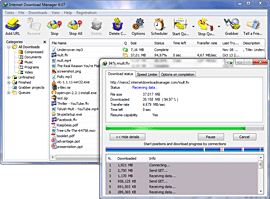
Internet Download Manager (IDM) is a tool to increase download speeds by up to 5 times, resume and schedule downloads. Comprehensive error recovery and resume capability will restart broken or interrupted downloads due to lost connections, network problems, computer shutdowns, or unexpected power outages. Simple graphic user interface makes IDM user friendly and easy to use.Internet Download Manager has a smart download logic accelerator that features intelligent dynamic file segmentation and safe multipart downloading technology to accelerate your downloads. Unlike other download managers and accelerators Internet Download Manager segments downloaded files dynamically during download process and reuses available connections without additional connect and login stages to achieve best acceleration performance.
Internet Download Manager supports proxy servers, ftp and http protocols, firewalls, redirects, cookies, authorization, MP3 audio and MPEG video content processing. IDM integrates seamlessly into Microsoft Internet Explorer, Netscape, MSN Explorer, AOL, Opera, Mozilla, Mozilla Firefox, Mozilla Firebird, Avant Browser, MyIE2, and all other popular browsers to automatically handle your downloads. You can also drag and drop files, or use Internet Download Manager from command line. Internet Download Manager can dial your modem at the set time, download the files you want, then hang up or even shut down your computer when it's done.

Other features include multilingual support, zip preview, download categories, scheduler pro, sounds on different events, HTTPS support, queue processor, html help and tutorial, enhanced virus protection on download completion, progressive downloading with quotas (useful for connections that use some kind of fair access policy or FAP like Direcway, Direct PC, Hughes, etc.), built-in download accelerator, and many others.
Version 6.23 adds Windows 10 compatibility, adds IDM download panel for web-players that can be used to download flash videos from sites like MySpaceTV, and others. It also features complete Windows 8.1 (Windows 8, Windows 7 and Vista) support, video page grabber, redeveloped scheduler, and MMS protocol support. The new version also adds improved integration for IE 11 and IE based browsers, redesigned and enhanced download engine, the unique advanced integration into all latest browsers, improved toolbar, and a wealth of other improvements and new features.

Download The Trial Version 

Try Internet Download Manager for free
Tags : Internet Download Manager,Manager Free,Download Idm,Download Accelerator,Up Downloads,Download Manager,Manager Filehippo,idm manager free download,internet download manager with patch,fastest download manager,internet speed up,free download manager,idm download,free software downloads,